








Temp Stick V2 review for RV pet monitoring: good alerts, WiFi decides the trip
Research-based Temp Stick V2 RV review with a campsite departure drill for WiFi, alerts, battery checks and emergency response.
The Temp Stick V2 is a strong no-subscription temperature monitor for an RV that has its own stable 2.4 GHz WiFi connection. It runs on two AA batteries, can send temperature, humidity, connection and low-battery alerts, and does not need a separate hub.[1][2]
Its best use is as an early-warning layer while a responsible person remains close enough to act. It is not a substitute for reliable climate control, a tested internet connection, an emergency contact or campground rules about unattended pets. Temp Stick markets the sensor for RV pet monitoring, but its warranty terms also disclaim uses that require fail-safe performance where a product failure could cause death or serious injury.[4][7]
Buy it if your RV has a dedicated hotspot or travel router, you want several people to receive alerts, and you will test the whole alert path at each campsite. Skip it if you plan to connect the sensor directly to campground guest WiFi, lack a nearby responder, or expect one cloud-connected sensor to make an unattended RV safe.
This is a research-based review. RVCamping.info did not buy or physically test this Temp Stick. The independent test observations below are attributed to their source. The campsite departure drill is an original RVCamping.info decision tool.
As an Amazon Associate, RVCamping.info earns from qualifying purchases. If you buy through an Amazon link in this article, we may earn a commission at no additional cost to you.
The exact black model reviewed is TEMPSTICK-TH-K-FBA, Amazon ASIN B01HH7YD2Y.[6] Check the Temp Stick listing on Amazon.[6] Confirm both identifiers because Amazon also carries other Temp Stick variants, including versions with AC power or an external probe.
The sensor is only as remote as its WiFi
The standard Temp Stick is compact, battery powered and simple in the useful sense: it measures ambient temperature and humidity, then uses an existing WiFi internet connection to send data and alerts.[1][2] Ideal Sciences lists a -40°F to 140°F temperature range, 0% to 100% relative-humidity range, ±0.15°C temperature accuracy, 2.4 GHz WiFi and battery life of more than a year under typical settings.[1]
Those specifications suit an RV interior. The connection requirement is the real compatibility boundary.
The current Amazon listing explicitly says the sensor is not for public or guest WiFi at RV parks, campgrounds, coffee shops or hotels.[6] That warning matters because many campground networks use a browser sign-in page, time-limited sessions or device restrictions. A sensor without a browser cannot complete the same guest-network ritual as a phone or laptop.
A dedicated mobile hotspot or travel router gives the Temp Stick a familiar network name and password at every stop. Ideal Sciences says the sensor can use a mobile hotspot, though it warns that iPhone and iPad hotspots may switch off after inactivity.[2] The cleanest RV setup is a router or hotspot that stays powered, reconnects automatically and has its own cellular data path. Before relying on it, check the campground's cellular signal where the RV is parked rather than at the office or entrance.
Temp Stick V2 can store as many as 1,000 readings while the internet is down and upload them after reconnection.[3] That protects the history. It does not deliver a live high-temperature warning during the outage. Offline storage is a record of what happened, not a rescue channel.
What it does well
The no-subscription model is the clearest advantage. Ideal Sciences says monitoring, data history and alerts remain available for the life of the sensor without a recurring fee.[1][2] The standard model can notify as many as ten contacts, and different thresholds can go to different people.[2] That supports a useful escalation plan: the owner receives the first warning, while a nearby campground contact receives a higher-temperature alert.
The sensor samples conditions every few seconds and sends an alert when a configured threshold is crossed, subject to the alert settings and working internet path.[2] Temp Stick V2 also supports connection-loss sensitivity settings and a backup WiFi network.[3] These are practical features for an RV because a missing check-in can be as important as a rising temperature.
Weather Station Advisor reported that its tested V2 tracked a Davis Instruments reference within one to two degrees for temperature and within 4% for humidity. Its reviewers also described alerts arriving within seconds to about a minute in their setup.[5] That is encouraging independent evidence, but it is one test environment rather than a promise for every hotspot, carrier and campsite.
There is a battery-management wrinkle. The same review found that the displayed battery level could stay at 100% until shortly before failure and advised against relying only on the indicator.[5] The sensible response is not constant battery replacement. It is a departure check that verifies a fresh reading and a delivered test alert.
Run one departure drill, not a settings tour
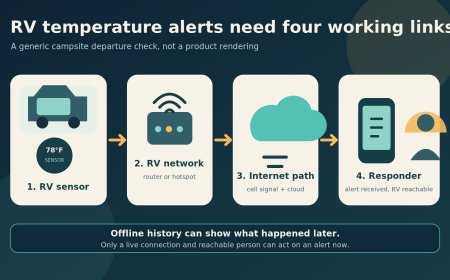
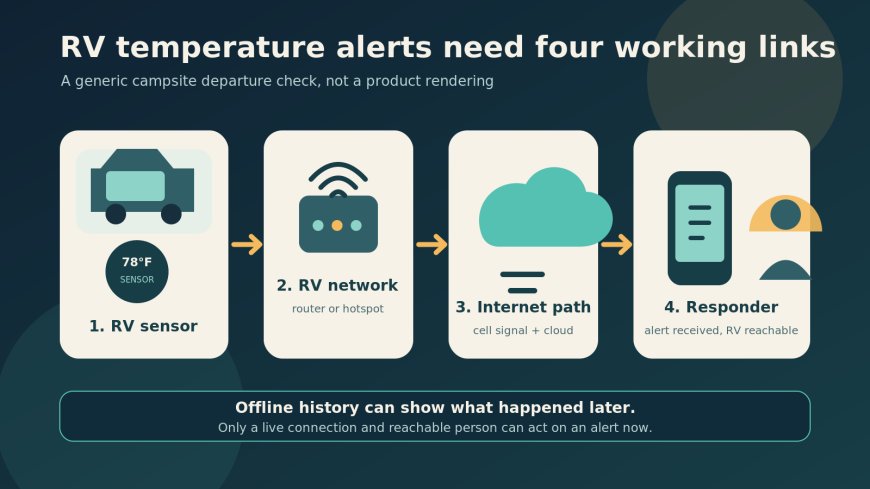
A monitor can show a perfect number while one link in the alert chain is broken. This four-link drill tests the actual job the product must do:
| Link | Test before leaving the RV | Pass condition | If it fails |
|---|---|---|---|
| Sensor | Compare the reading with a second thermometer after the sensor has stabilized | The readings are plausibly close and the sensor is placed in the pet's occupied air, away from sun, vents and a cold wall | Move the sensor, allow it to settle and investigate a persistent difference |
| RV network | Open the Temp Stick dashboard on cellular data, not the RV's WiFi | A current check-in appears and connection alerts are armed | Repair the router, hotspot or cellular link before leaving |
| Alert delivery | Temporarily set a threshold close enough to trigger safely | Every assigned contact receives the intended text, email or push alert | Fix contact permissions, notification settings or carrier filtering |
| Response | Send the test alert to the person who would act if you could not return | That person acknowledges the message and can reach the RV | Do not leave the pet without another workable response plan |
The drill is deliberately short. It follows one alert from the sensor to a person who can open the RV. A dashboard screenshot from yesterday does not pass it.
Placement needs the same practical restraint. The product page describes the standard unit as an ambient sensor, and the manufacturer says it is not waterproof.[1][2] Put it where the animal actually rests, but not in direct sun, against an exterior wall, beside an air-conditioning outlet or where water can reach it. A second thermometer beside the Temp Stick during setup can catch a bad location or a reading that has not settled.
Use at least two alert levels if the pet plan depends on the monitor. The first should give enough time to return or send help. The second should notify another contact. Thresholds depend on the animal, health, acclimation, ventilation and the speed at which that particular RV heats or cools, so a veterinarian is the right source for pet-specific limits.
A connection alert is not a power-outage alert
The standard battery-powered Temp Stick can warn that it lost its internet connection.[1][2] It cannot tell you why. The RV may have lost shore power, the air conditioner may have failed while the router kept running, the hotspot may have dropped cellular service or the sensor may simply have lost WiFi.
That distinction changes the equipment choice. The standard model keeps measuring when shore power fails because it uses AA batteries, but it still needs the router, modem and internet path to send the alert. Temp Stick's AC-powered variants add explicit power-outage alerts, while the standard model does not.[1][2] Even an outage alert cannot confirm that the air conditioner restarted or that the interior temperature recovered.
Keep the climate system maintained, power the RV network from a dependable source, arm connection alerts and give another person access. If a campsite has weak cellular service, no safe fallback and no nearby responder, the right reading on the screen does not fix the trip plan.
The warranty language reinforces that boundary. Ideal Sciences disclaims fail-safe uses in which product failure could lead to death or serious injury.[4] At the same time, the company markets Temp Stick for RV pet monitoring.[7] Read together, those pages support a narrow conclusion: the device is a useful warning tool, but the owner remains responsible for the climate system and response plan.
Who gets the best fit
Temp Stick V2 fits RV owners who already operate a dedicated hotspot or travel router and dislike monthly monitoring fees.
Its battery power, multiple contacts, connection alerts and offline history are useful.[1][2][3]
Independent test evidence also supports its basic temperature performance.[5]
It is a poorer fit for campers who move frequently between guest networks, rely on a phone hotspot that sleeps, or travel where cellular service is inconsistent. It is also the wrong product to treat as permission to leave an animal alone for longer or farther away than the response plan can support.
Measurement accuracy is the easy part of this purchase. The harder question is whether the RV can keep the sensor, local network, internet path and responder working together. Run the departure drill at the campsite. If any link fails, fix the plan before leaving the pet.
Sources
- Temp Stick WiFi temperature and humidity sensor product page (accessed October 29, 2026)
- Temp Stick common questions (accessed October 29, 2026)
- Temp Stick v2 update details (accessed October 29, 2026)
- Ideal Sciences warranty and fail-safe limitation (accessed October 29, 2026)
- Weather Station Advisor Temp Stick V2 review (accessed October 29, 2026)
- Amazon US Temp Stick listing, ASIN B01HH7YD2Y (accessed October 29, 2026)
- Temp Stick RV pet temperature monitor page (accessed October 29, 2026)
What's Your Reaction?