





Starlink Mini RV review: low draw, but count the daily watt-hours
Research-based Starlink Mini RV review with clear-sky, Roam-plan and mount checks plus an original battery and solar energy model.
Starlink Mini is the compact satellite-internet kit that makes the most sense for RVers who watch every watt. The dish, model UTA-231, has integrated Wi-Fi, accepts 12–48V DC, and is rated at 25–40W average consumption. That is a friendly load by satellite-internet standards. It is still an all-day load if you leave it running.[1][9]
Buy it if your campsites usually offer open sky, your Starlink account offers a suitable Roam plan, and your battery budget can spare roughly 260–350Wh for an eight-hour day. Skip it if you mainly camp under trees, expect the hardware price to include service, or cannot give internet its own place in the RV's daily energy budget.
This is a research-based review. RVCamping.info did not buy, install, or physically test the Starlink Mini Kit. Independent measurements are identified as such.
As an Amazon Associate, RVCamping.info earns from qualifying purchases. If you buy through an Amazon link in this article, we may earn a commission at no additional cost to you.
The exact product covered here is the Starlink Mini Kit, dish model UTA-231, Amazon sale SKU 02535001-AMSB, ASIN B0HKMLLS7R. The listing identity was checked on October 26, 2026: check the Starlink Mini Kit listing on Amazon.[8][9] Availability and seller details can change, so match all three identifiers before ordering.
The dish is efficient; the day is long
Starlink publishes a 25–40W average for Mini and a 60W input rating. Those numbers have different jobs. The average range is useful for estimating energy. The 60W figure belongs in power-source and cable sizing; it is not the ordinary continuous draw.[1]
Two independent reports put useful texture around the official range. DISHYtech's owner measured 40–50W while the dish booted and found 20–30W after the connection settled.[10] An Escape RV Owners Forum member using a USB-C power meter recorded 64Wh over 3 hours 6 minutes, with post-boot readings ranging from about 11W to 38W.[11] Neither is a controlled laboratory test, but both support using 30W for a normal planning case and 40W for a cautious one.
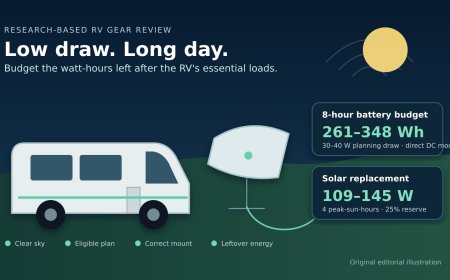
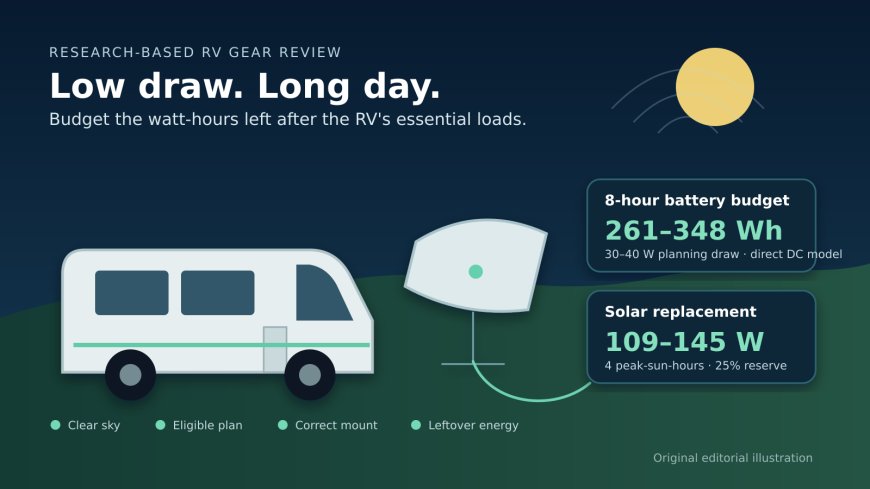
The problem appears when watts meet hours. At 30W, eight hours at the dish is 240Wh. Allowing 8% for a direct-DC power path raises the battery-side need to about 261Wh. At 40W, the same workday reaches about 348Wh. Running all day takes about 783Wh at 30W or 1,043Wh at 40W. Low draw and low daily energy are not the same thing.
Put the rest of the RV first
A useful budget starts with what remains after refrigeration, lights, the water pump, furnace blower, laptops, and reserve. For a 100Ah, 12.8V LiFePO4 bank, suppose only 80% is allocated as usable and 600Wh is protected for everything except internet:
- Usable bank energy:
100Ah × 12.8V × 0.80 = 1,024Wh - Energy left for Mini:
1,024Wh − 600Wh = 424Wh - Modeled Mini runtime: 13.0 hours at 30W, or 9.75 hours at 40W, with a 92% efficient DC path
That is the article's decision model: protect the coach first, then divide the leftover watt-hours by the battery-side hourly cost of Mini. A nominal 100Ah battery is not automatically a 24-hour Starlink battery.
| Use pattern | Dish draw | Time | Battery-side energy at 92% DC efficiency | 12.8V battery use |
|---|---|---|---|---|
| Short session | 20W | 4h | 87Wh | 6.8Ah |
| Workday plan | 30W | 8h | 261Wh | 20.4Ah |
| Cautious workday | 40W | 8h | 348Wh | 27.2Ah |
| Always on | 30W | 24h | 783Wh | 61.1Ah |
| Always on, cautious | 40W | 24h | 1,043Wh | 81.5Ah |
Direct DC can matter if it lets the RV inverter stay off. For the same eight-hour, 30W session, this model gives 261Wh through a 92% efficient DC path. An illustrative AC path at 85% efficiency plus an 8W inverter idle load reaches 346Wh, about 33% more. Those inverter figures are assumptions, not product facts; substitute measurements from your own system.
Solar replacement is another energy calculation, not a panel-nameplate promise. With four peak-sun-hours, 75% end-to-end recovery, and a 25% weather and shading reserve, replacing an eight-hour Mini day calls for about 109W of panel at the 30W case or 145W at 40W. That capacity is dedicated to Mini. The rest of the RV still needs its share.
Three compatibility gates decide the purchase
The Mini kit is physically easy to carry: the bare unit is 2.43 pounds and roughly 11.75 by 10.2 by 1.45 inches. It includes integrated dual-band Wi-Fi, a kickstand, pipe adapter and flat mount, 15m DC cable, power supply, and plug.[1][2] None of that removes the three checks that determine whether it works for a particular trip.
1. The sky must be open enough
Mini needs a 110-degree field of view. Starlink's setup guide says a branch, pole, or roof in the path can interrupt service and directs owners to check the location with the app.[1][2] A wooded campground can defeat an otherwise ideal battery and service setup. For parked use, the practical advantage of a portable dish is the ability to move it away from the RV in search of open sky, while keeping the cable route protected from traffic and damage.
The IP67 Type 4 rating also has a boundary: Starlink ties it to the specified DC cable and plug or Starlink cable. Its setup guide says a standard RJ45 cable removes the IP67 rating.[1][2] An ordinary Ethernet lead may work electrically without preserving the published weather rating.
2. Hardware and service permission are separate
Starlink lists Mini as hardware supported for in-motion use and says eligible Roam plans can support motion up to 100mph in authorized places.[5] Driving use is excluded under Residential service. Starlink also says Standby Mode isn't for connectivity while moving.[5] The current US plan descriptions distinguish unlimited and capped Roam offerings, congestion priority, domestic-only limits on capped plans, and separate rules for international or ocean use.[7]
The safe purchase assumption is narrow: the kit does not include a universal right to connect anywhere. Check the plans offered to the account, registered country, intended travel area, data terms, and motion permission before buying hardware. Recheck plan language before a long border-crossing trip because availability and regulatory approval can change.
3. Match the mount to parked or moving use
The included kickstand, pipe adapter, and flat mount are useful for setup, but they should not be treated as a blanket roof-installation approval. Starlink's accessories guide separately identifies a Mini Mobility Mount for permanent mounting and a Mini Roof Rack Mount for compatible non-round rack bars.[3]
For a moving installation, Starlink's guide calls for a structurally sound horizontal surface, firm attachment, compliance with applicable transportation rules, and a tether for unexpected wind events.[2] The US terms also prohibit an unstable vehicle or vessel mount.[6] Parked portable use and roof-mounted travel are different installations. Decide which one you need before choosing hardware or drilling the roof.
Power it without improvising the cable
Mini accepts 12–48V DC and carries a 60W input rating.[1] Starlink's car adapter is specified for a standard 12–24V vehicle auxiliary outlet. Its 5m USB-C cable requires a 100W, 20V/5A source.[3] That 100W USB-PD requirement can look excessive beside a 25–40W average, but the source still has to satisfy the supported power profile and startup behavior.
For an RV battery installation, account for fuse protection, connector polarity, cable length, voltage drop, outlet condition, and the power source's sustained rating. A random USB-C charger or long barrel cable is not equivalent to the specified path. If the outlet, plug, or cable warms in normal use, stop and inspect the setup rather than accepting heat as the price of portability.
The kit's integrated Wi-Fi keeps the basic system compact. A separate router, long Ethernet run, or always-on inverter adds its own energy cost, so include those devices in the same watt-hour budget. The model above covers Mini itself and an assumed conversion path, not every accessory in the network.
Who gets the best fit
Mini is strongest for an RVer who needs a few reliable working hours at open-sky sites and already understands the trip's service plan. In that setting, the small dish, integrated router, DC options, and modest draw solve a real storage and power problem. An eight-hour internet day can fit inside many lithium and solar systems when 260–350Wh has been reserved for it.
It is a poor fit for campers who choose dense shade most of the time, want service bundled with the hardware, or have only a narrow battery margin after essential loads. It also deserves a pass if the plan or mount required for driving use is unavailable. Buying the dish does not fix any of those constraints.
The decisive tradeoff is simple enough to miss: Mini draws little at any one moment, yet internet tends to stay on for hours. Buy it for the low power rate, but size the RV around the total energy. Clear sky, an eligible plan, a purpose-matched mount, and a leftover-watt-hour calculation are what turn the compact kit into a good RV tool.
Sources
- Starlink Mini specifications (accessed October 26, 2026)
- Starlink Mini setup and installation guide (accessed October 26, 2026)
- Starlink Mini accessories guide (accessed October 26, 2026)
- Starlink in-motion use support guidance (accessed October 26, 2026)
- Starlink US terms of service (accessed October 26, 2026)
- Starlink US service plan descriptions (accessed October 26, 2026)
- Amazon US Starlink Mini Kit listing, ASIN B0HKMLLS7R (accessed October 26, 2026)
- Starlink UTA-231 declaration of conformity (accessed October 26, 2026)
- DISHYtech six-month Starlink Mini owner review (accessed October 26, 2026)
- Escape RV Owners Forum measured power-consumption report (accessed October 26, 2026)
What's Your Reaction?