







How Recreation.gov Reservation Windows Work: A Rolling Calendar for RV Campers
A practical rolling-calendar method for tracking facility-specific Recreation.gov booking windows, staggered releases, cut-offs and RV-compatible backups.

A six-month reminder is useful. Treating six months as a universal Recreation.gov rule is not.
Recreation.gov defines a booking window as the number of days, weeks or months before a reservable date when a reservation can be made. The facility sets that window, and different facilities and activities use different schedules.[1] Recreation.gov's own planning advice says most campsites can be booked six months before arrival, while some locations also release inventory on shorter windows.[2]
That distinction matters when the campsite must fit a 35-foot fifth wheel, has the only electric hookup in a loop or sits inside a park that fills on summer weekends. The most useful planning tool is not one alarm labeled "book campground." It is a small rolling calendar built from the rules shown for each campground.
First, separate three dates that are easy to mix up
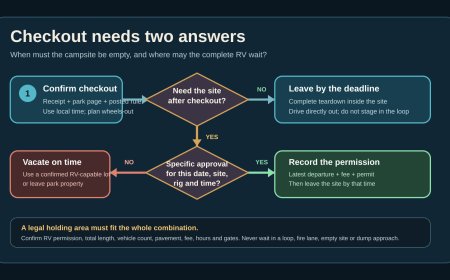
A booking window answers, "How far ahead can I reserve?" The on-sale time answers, "At what hour does new inventory appear?" A cut-off window is the last date or time an advance reservation or change can be made. Recreation.gov says cut-off windows vary by location and are typically zero to four days before arrival.[3]
Write all three down separately. Recreation.gov says most campgrounds go on sale at 7 a.m. Pacific, 8 a.m. Mountain or 10 a.m. Eastern, but it immediately warns that this is not always the case. The campground's facility page supplies the date and time to use.[2]
The facility page wins when a general rule and a local rule differ. Recreation.gov says location-specific policies supersede its site-wide policies.[3] Agency pages can add useful detail, but check the live Recreation.gov listing before every release because inventory and operating seasons can change.
Build the calendar backward from several acceptable arrivals
Start with an arrival band instead of one perfect date. If Sunday through Thursday works, enter every acceptable arrival date. A rolling system gives each arrival its own release event, so a missed Sunday does not make you forget Monday.
Create one calendar row for each campground and arrival option. Record:
- campground, loop and site type;
- acceptable arrival date and number of nights;
- exact booking window shown on the facility page;
- exact release date, time and time zone;
- later release waves, if listed;
- the campground's reservation cut-off;
- three to five RV-compatible backup sites;
- the URL of the facility page and the date you checked it.
Do the RV filtering before release morning. Remove sites that are too short for the combined equipment described in the listing. Note whether a tow vehicle must share the pad, whether hookups are required, and whether a generator rule makes a no-hookup site impractical. A site that appears available but cannot hold the rig is not a backup.
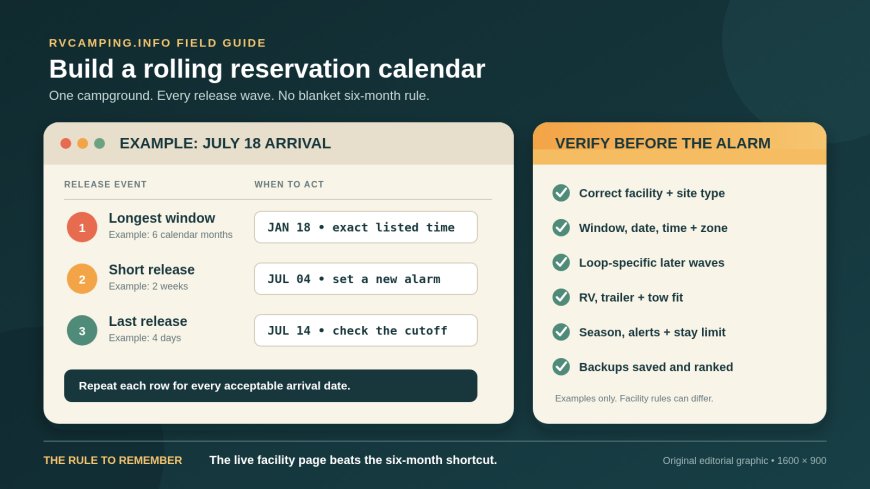
For a July 18, 2027 arrival, a facility using a six-calendar-month window would point you to January 18, 2027. If that same campground advertised two-week and four-day waves, those dates would be July 4 and July 14. These dates are examples, not a prediction for any campground. Confirm the actual date and time on the listing.
Add reminders that force a fresh check
For every release event, add three reminders:
- Thirty days before: reopen the facility page, confirm the operating season and recheck the booking rule.
- Seven days before: choose the site shortlist, read current alerts and confirm the rig details saved in your notes.
- The evening before: sign in, verify contact and payment information, and check the release time once more.
This is where the "rolling" part earns its keep. Each week, review the next eight weeks of release events. Newly announced short-term inventory goes into the same calendar rather than a separate note that is easy to lose.
A spreadsheet is fine, but a normal calendar works better for many travelers because it produces alerts in the correct time zone. Put the time zone in the event title anyway. "Glacier Basin, 10 a.m. ET" is harder to misread than "Glacier Basin opens at 10."
Treat staggered releases as separate chances
Some popular campgrounds do not release every reservable site at the longest window. Shenandoah National Park, for example, says reservable inventory at Mathews Arm, Big Meadows and Loft Mountain is released in sections: 50 percent six months before arrival, 25 percent two weeks before, and the remaining 25 percent four days before.[4] The park also keeps some campgrounds or sites first-come, first-served, while Big Meadows is reservation only.[4]
That is a good illustration, not a template for the whole federal system. Another park may release different percentages, use different intervals, reserve every site, or offer no advance reservations at a particular campground. Put each published wave on your calendar and label which loops or site types it covers.
Short-window inventory can be especially useful for an RVer who has already settled the route and can travel on a weekday. It is still competitive, and it should not be treated as guaranteed inventory.
Use one clean booking setup
Recreation.gov recommends signing in before the sale, becoming familiar with the availability matrix and refreshing at the stated release time.[2] It also advises against using the same account in multiple browsers, tabs or windows because doing so can trigger a reCAPTCHA challenge.[2]
My booking-morning checklist is deliberately short:
- Open the campground page in one browser window.
- Sign in early and verify the clock and time zone.
- Keep the primary site list and backups beside the screen.
- Refresh at the listed release time.
- Check the selected dates and site length before adding to the cart.
- Finish checkout without wandering off to compare another loop.
After a campsite is added to the cart, Recreation.gov holds it there for 15 minutes; if checkout is not completed, the site is released.[2] That is enough time to verify the reservation, but not enough time to begin researching whether the pad fits.
Keep a recovery lane on the same calendar
A failed first attempt should change the calendar, not end the search. Add any published short-window waves immediately. Recreation.gov also offers availability alerts for booked campsites that match selected preferences, though everyone with a matching alert receives the notice and the alert does not reserve the site.[2]
Then widen one variable at a time. Try a Sunday arrival, one fewer night, a nearby federal campground or a site without hookups if the RV can comfortably support it. Avoid changing every variable at once; otherwise, you may book an option that solves availability while creating a rig-fit or power problem.
First-come, first-served inventory is another local exception, not a universal fallback. At Shenandoah, for example, some campgrounds have walk-up sites, one is entirely first-come, first-served, and the park prohibits overnight RV stays outside its campgrounds.[4] Read the agency page before building a drive-up plan around overflow parking or roadside camping.
The five-minute verification before relying on any date
Run this check whenever a reminder fires:
- Is this the correct facility and the correct site type?
- Does the Seasons and Booking or Seasons and Fees section still show the same window?
- Is the release tied to the arrival date, a fixed block date or a named loop?
- What exact time and time zone are displayed?
- Are there later release waves?
- Does a reservation cut-off block a last-minute booking?
- Is part of the campground first-come, first-served or closed for the season?
- Does the site fit the RV, tow vehicle and equipment as the listing measures them?
- Have alerts, closures, stay limits or local rules changed?
- Is the backup campground in the calendar too?
The method is intentionally boring. It replaces a vague "six months out" rule with dated, facility-specific checks. For a popular federal campground, that small bit of clerical work is often the difference between having several legitimate attempts and discovering the exception after the calendar has already rolled past it.
Source note: RVCamping.info reviewed Recreation.gov's FAQ, reservation guidance and site-wide policies, plus the National Park Service's current Shenandoah campground reservation page. The rolling-calendar workflow and RV verification checklist are original editorial guidance.
Sources
[1] Frequently Asked Questions | Recreation.gov
[2] Tips for Making Campsite Reservations at Popular Locations | Recreation.gov
What's Your Reaction?