









The Alert Is Not the Campsite: An RV Cancellation-Booking Plan
Turn a campsite cancellation alert into a safe RV booking by pre-qualifying dates, rig fit, required services, checkout steps, and the backup reservation.


The Alert Is Not the Campsite: An RV Cancellation-Booking Plan
By Romana | October 9, 2026
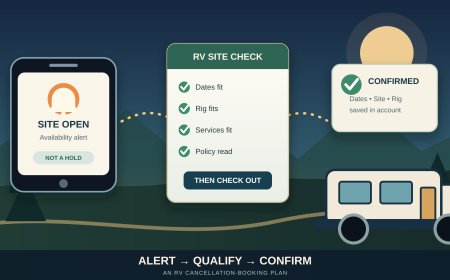
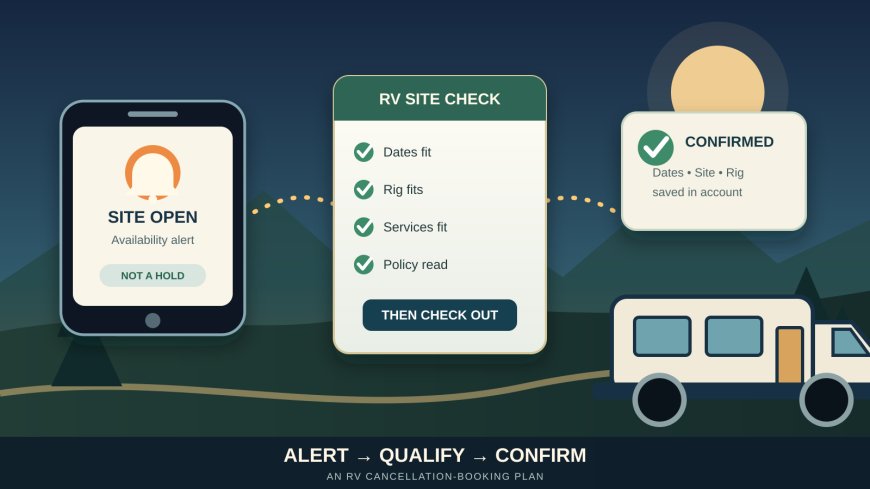
A campsite alert can arrive while you are fueling, eating dinner, or halfway through a work call. By the time you open the booking page, the site may be gone. That does not mean the alert failed. It means an alert reports availability; it does not reserve anything for you.
Recreation.gov says its availability notification goes to everyone who set an alert for the same date, so receiving one does not guarantee a reservation.[1] The useful response is not simply "click faster." It is to decide in advance which dates, loops, hookups, and site limits are acceptable, then keep the booking step short without skipping the RV-fit check.
Source note: This original RVCamping.info guide uses current Recreation.gov and National Park Service instructions. It addresses cancellation alerts and fast qualification of an RV site, a distinct intent from our September 7 guide to rolling reservation windows, September 9 cancellation-policy guide, and September 11 guide to reading campsite photos and dimensions.
Decide what the alert is allowed to offer
An alert that is too broad creates work at exactly the wrong moment. Before setting one, write a small acceptance card for the trip:
- arrival and departure dates you can actually use;
- the shortest acceptable stay;
- campground or loop choices;
- RV or trailer length, plus tow-vehicle parking needs;
- required electrical service, water, or accessibility features;
- generator dependence if the site has no electric hookup;
- pets, extra vehicles, occupancy, and equipment type;
- a maximum total price, including fees;
- the latest date when changing the trip still makes sense.
Separate requirements from preferences. A 30-amp connection may be a requirement for someone who cannot support an overnight medical power need from the RV battery. A river view is a preference. A listed maximum vehicle length that does not fit the rig is a rejection, not a compromise.
Recreation.gov's own booking advice tells users to learn the availability matrix, keep account and contact details current, and consider nearby alternatives.[1] Do that work before the notification. The alert should lead to a short list you already understand, not a fresh research project.
Pre-check the campground, then qualify the exact site
A campground-level alert does not prove that every newly available site fits the RV. Pre-check the facility page once and save notes on:
- booking and operating season;
- arrival, gate, and check-in rules;
- hookups and generator hours;
- road or tunnel restrictions on the approach;
- pets, extra vehicles, and occupancy;
- local cancellation and change terms.
Then, when a site appears, inspect the exact listing. Confirm the site's stated equipment type and maximum lengths. Look at the parking surface, back-in or pull-through arrangement, grade, obstacles, slide and awning space, hookup position, and where the tow vehicle must go. If a detail is missing, treat it as unknown rather than favorable.
This two-level check is faster than reading the entire campground page after every alert, but it still protects against booking a site that is technically open and physically useless. It also leaves a clean stop rule: if a required field is unknown and the campground cannot confirm it in time, let that opening go.
Build a one-screen response card
Keep the response card in a phone note, not buried in a trip-planning document. It should fit on one screen:
| Field | Your entry |
|---|---|
| acceptable dates | exact date ranges |
| acceptable campgrounds or loops | named list |
| minimum stay | number of nights |
| rig limit | measured RV/trailer length and total parking need |
| hookups | required vs. optional |
| hard rejections | written list |
| booking account | correct email and traveler name |
| payment | valid saved method or card ready through a secure checkout |
| backup booking | place, dates, and cancellation deadline |
| stop time | when you quit chasing alerts |
The hard-rejection line matters. It keeps urgency from rewriting the plan. Examples include "tent-only," "no trailers," "site shorter than trailer," "no room for tow vehicle," or "arrival after the gate closes with no approved late-entry process."
Do not store a card number, password, or security code in the note. Recreation.gov recommends checking the account, contact information, and payment setup ahead of the sale.[1] Use the site's account and checkout tools rather than turning a convenience note into a security problem.
Use the alert as a signal, not a starting gun
When the message arrives, follow the same order every time:
- Open the official reservation page from your saved bookmark or account, not from an unexpected lookalike message.
- Confirm the facility, dates, and number of nights.
- Open the exact site record.
- Compare it with the acceptance card.
- Put it in the cart only if every requirement passes.
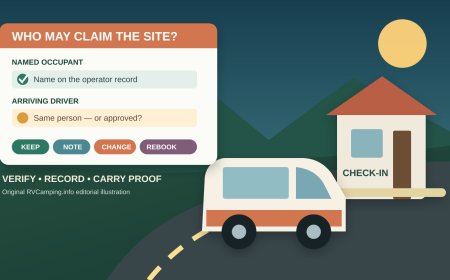
- Read the total, occupant details, and policy shown at checkout.
- Complete payment, then save the confirmation number and a copy of the reservation.
- Re-open the reservation in your account and verify dates, site, equipment, and traveler name.
Recreation.gov says a selected campsite is held for 15 minutes after it is added to the cart, and released if checkout is not completed in that period.[1] That window is useful, but it is not permission to stop reading. Use it for the exact-site check and checkout, not for researching the whole destination.
A notification is not a confirmation. A site visible in the calendar is not a confirmation. A site in the cart is not a confirmation. The booking becomes travel-ready only when it appears correctly in the account and the confirmation matches your plan.
Search one night at a time when the full stay hides openings
A cancellation may free only part of the trip. Yosemite National Park advises people searching for cancellations to start with the first desired night and search one night at a time.[3] This can reveal a usable night that a full-stay search does not surface.
For an RV trip, use that tactic only with a move plan. If Tuesday opens in Site 18 and Wednesday opens in Site 42, check both sites for rig fit and ask whether a mid-stay move is operationally reasonable. A move means retracting slides and awnings, securing the interior, disconnecting utilities, checking the route between loops, and complying with checkout and check-in timing. It may be worthwhile for a small camper van and a poor choice for a large towable with a complicated setup.
Keep the reservation pieces legible:
- write each night beside its site number;
- note any unreserved gap;
- distinguish a confirmed booking from an active alert;
- record the change-day checkout and next-site occupancy time;
- keep a legal backup outside the destination for every missing night.
Do not treat a parking lot or roadside pullout as the gap plan. Yosemite, for example, states that sleeping in a vehicle is allowed only in campsites and warns travelers not to arrive without a reservation during seasons when no first-come sites are available.[3] Local rules vary, so verify the actual destination rather than borrowing Yosemite's rule for another park.
Protect the backup before replacing it
A cancellation alert can tempt you to cancel the existing backup first, especially if the new site looks perfect. Reverse that order:
- qualify the new site;
- complete the new reservation;
- verify it in the account;
- compare the two confirmed bookings;
- read the backup's cancellation deadline and cost;
- cancel only the reservation you will not use;
- save the cancellation receipt.
Recreation.gov's standard policy says location-specific rules can supersede its site-wide rules.[2] Its published standard policy also describes nonrefundable reservation fees, cancellation fees, late-cancellation penalties, and cut-off windows, but the exact facility page controls when it differs.[2] Put the backup deadline on the response card before setting alerts.
Do not hold duplicate campsites longer than needed. Apart from the cost risk, an unused booking keeps someone else from making a real trip plan. Once the preferred reservation is verified, finish the comparison and release the backup under its stated rules.
Know when to stop chasing
An alert plan needs an end point. Stop when any of these is true:
- the backup's free or acceptable cancellation period has ended;
- changing sites would break another reservation or route deadline;
- the remaining openings do not fit the RV;
- the only possible itinerary includes an unverified overnight gap;
- repeated alerts are pushing you toward a rushed or unsafe choice.
The stop time turns the backup into the trip instead of treating it as a consolation prize. You can then finish route checks, weather checks, food planning, and arrival instructions without waiting for another bell.
The five-minute readiness check
Before turning on an availability alert, confirm:
- the alert dates match days you can travel;
- the campground has at least one site type that can fit the RV;
- your acceptance card separates requirements from preferences;
- your account name, email, and payment method are current;
- the backup reservation and its cancellation deadline are recorded;
- you know whether a one-night opening is useful;
- you will verify the final reservation in the official account;
- you have a stop time.
Speed helps only after the decision has been made. The best alert setup removes choices from the frantic minute after the email, while preserving the checks that keep an RV out of the wrong site.
Sources
- Recreation.gov: Tips for Making Campsite Reservations at Popular Locations — availability-alert limits, account and payment readiness, nearby alternatives, and the 15-minute cart hold; accessed October 9, 2026.
- Recreation.gov: Rules and Reservation Policies — site-wide fees, cancellation and change rules, cut-off windows, and the priority of location-specific policies; accessed October 9, 2026.
- National Park Service: Help! I can't find a camping or lodging reservation — Yosemite's alert, one-night cancellation-search, reservation, and vehicle-sleeping guidance; updated February 18, 2026 and accessed October 9, 2026.
What's Your Reaction?