















Can Someone Else Use Your Campsite Reservation? Build a Named-Occupant Plan
A practical workflow for checking whether another traveler may arrive first, replace the named occupant, or must cancel and rebook an RV campsite reservation.

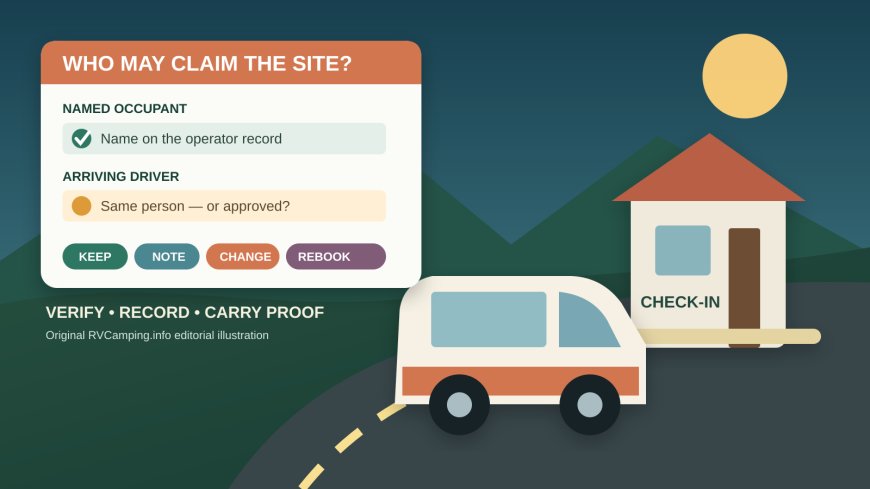
Can Someone Else Use Your Campsite Reservation? Build a Named-Occupant Plan
By Romana | October 8, 2026 | RV Camping
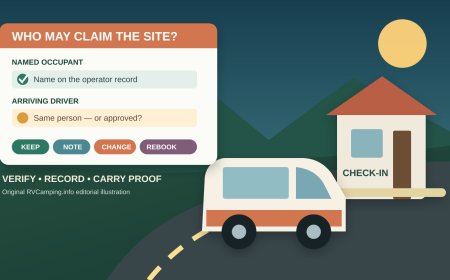
The person who clicks “book” is not always the person who reaches the campground first. A spouse may drive the RV while the account holder arrives later. Friends may trade rigs. The original traveler may drop out entirely. Treating those situations as an informal name swap can put the campsite at risk.
There is no universal campground handoff rule. Some systems distinguish the purchaser, account owner, primary occupant, pass holder and arriving driver. Some properties allow a change; others require the named person to appear with identification. The safe workflow is to identify the role that matters for the exact reservation, get any permitted change recorded by the operator, and carry proof of the approved result.
This is a different problem from late arrival. Telling the campground that the same party will arrive tomorrow does not necessarily authorize a different party to use the booking.
First decide which of three situations you have
Use the facts, not the group chat:
- The named occupant is still camping and can check in. Keep the reservation in place. Confirm whether another driver may arrive first and what staff wants that person to do.
- The named occupant is camping but cannot be present at check-in. Ask whether staff can note an authorized early arriver without changing the primary occupant.
- The named occupant will not camp. Ask whether the operator permits a primary-occupant change. If not, the legitimate path may be cancellation and a new booking, subject to availability and fees.
Do not collapse these into “someone else is using my site.” They can produce different answers under the same campground’s rules.
Read the exact facility record before changing anything
Start with the confirmation, then open the live page for the precise campground. Search for primary occupant, reservation holder, photo ID, transfer, discount, accessible site, check-in and no-show. General platform terms matter, but a facility can add a stricter condition.
Watchman Campground at Zion is a clear example. Its official Recreation.gov listing says the primary occupant on the reservation must show photo identification at check-in and that the primary occupant’s name cannot be changed after booking.[2] A forwarded confirmation would not satisfy that published rule if the listed person is absent.
California State Parks uses different wording. Its statewide policy says reservations are for personal use and prohibits unapproved resale or transfer. It also tells arriving campers to be ready with the reservation confirmation and photo identification.[3] This is why a private payment between friends is not a harmless workaround: it may convert a scheduling problem into a prohibited transfer.
Oregon State Parks adds another distinction. Only the person named on a reservation has access to change it, according to the agency’s change page.[4] That statement concerns authority to make changes; it should not be stretched into a claim that every Oregon park handles arriving guests identically. Ask the exact park who must be present.
Separate five names that may look interchangeable
Write a small role table before calling:
| Role | Person on this trip | What to verify |
|---|---|---|
| Account owner or purchaser | May this person edit or cancel? | |
| Primary or named occupant | Must this person camp or show ID? | |
| Arriving driver | May this person enter or occupy first? | |
| Discount or pass holder | Must the holder and original credential be present? | |
| Accessible-facility occupant | Who must provide eligibility proof? |
The last two rows require special care. Watchman says a qualifying pass used for its camping discount must be presented with valid identification at check-in.[2] California says discount eligibility proof must be shown at check-in, and it separately explains the documentation used for accessible overnight facilities.[3] A reservation can therefore remain valid as a campsite booking while a discount or restricted-site qualification still depends on the correct person and proof.
Do not describe a companion as a pass holder, primary occupant or eligible occupant unless the operator’s record says so. Never alter a confirmation screenshot or borrow somebody’s credential.
Ask a narrow question before you cancel
Contact the reservation system or campground through the number or channel on the official listing. Have the confirmation number, dates, site, current named occupant and proposed arriver ready. Do not post those details in a public message.
Use this script:
“Reservation [last four characters], site [number], starts [date]. [Named person] is [still camping / arriving later / no longer traveling]. [Other person] would [arrive first / become the occupant]. Does your policy allow that? If yes, what exact change or note must your staff make, who must show photo ID, and will any discount or accessible-site proof be required?”
Then ask for the answer in a durable form: an updated confirmation, case number, email, or note visible to campground staff. Record the agent or office, date, local time and callback number. A verbal “should be fine” without a reservation update is weak evidence at an unstaffed gate or shift change.
Do not cancel first merely to see whether the campsite returns to inventory. Recreation.gov’s general rules allow cancellations before arrival but apply service fees and additional consequences near the arrival date; they also state that on-site staff may or may not be able to help once the reservation date has begun.[1] If cancellation and rebooking is the only permitted route, learn the deadline, cost and release mechanics before giving up the existing reservation. There may be no safe way to guarantee that the replacement traveler captures the site.
Build the pre-booking named-occupant plan
The cleanest handoff is the one you avoid. Before paying for a scarce or restricted campsite:
- Choose the person most likely to camp as the primary occupant.
- Enter that person’s legal name exactly as it appears on their photo ID.
- Confirm which traveler owns any pass or discount used.
- For an accessible facility, confirm the operator’s eligibility and presence rules without collecting unnecessary medical information.
- Decide who controls the reservation account and who is authorized to contact the operator.
- Put the change and cancellation deadlines on the shared trip calendar.
- Name a backup traveler, but do not assume that label makes the reservation transferable.
Where the booking page lets the purchaser and primary occupant be different, use the fields as labeled. Do not put the group organizer in every box out of habit.
Make a minimal offline check-in record
Once the operator confirms the arrangement, save one paper copy and one offline digital copy that contain only what the travelers need:
- campground name, official phone number and site number;
- arrival and departure dates;
- confirmation number, with only the portion needed for lookup visible on a shared copy;
- primary occupant’s name exactly as confirmed;
- name of the person permitted to arrive first, if the operator recorded one;
- approved change or case number and the date it was made;
- required check-in documents, listed but not photographed;
- gate, office and after-hours instructions from the confirmation;
- deadline for the named occupant to appear, if staff supplied one.
Keep actual photo identification, payment cards and eligibility credentials with their owners. Do not place account passwords, full card numbers, driver-license scans or medical records in the shared packet. An offline sheet should help staff locate the booking; it should not become an identity-theft kit.
Recheck at three points
After any traveler change: reopen the account and make sure the displayed names, dates and site still match the approved arrangement. Save the new confirmation, not just the call notes.
Two or three days before arrival: read the current facility notice and confirmation again. Check office hours, gate procedure and the number to call if arrival shifts. General Recreation.gov policy treats a camper as a no-show when they have not arrived or cancelled by checkout time on the day after scheduled arrival, but local instructions can require contact sooner.[1] California and Oregon publish their own hold and contact rules, underscoring that the deadline must come from the booked operator.[3][4]
At check-in: the arriving traveler should state the arrangement plainly and present only the documents the operator requested. If the desk cannot see the change, show the updated confirmation or case number and ask staff to call the official reservation office. Do not pressure a volunteer host to override a named-occupant or eligibility rule.
Yosemite’s campground FAQ illustrates why local instructions belong in the packet: after-hours arrivals may proceed to the reserved site, but the visitor must check in the next morning; someone arriving later than the reserved arrival date is told to call the campground office.[5] That solves an arrival-timing problem. It does not, by itself, change the named occupant.
Use a decision record, not a permission assumption
Your final trip note should end with one of four outcomes:
- Keep: named occupant will comply with check-in and presence rules.
- Note: operator recorded another traveler arriving first; named occupant remains unchanged.
- Change: operator formally changed the permitted field and issued proof.
- Cancel and rebook: transfer was not allowed and a new reservation was successfully confirmed.
If the operator will not approve the proposed arrangement, choose a different traveler, date or campground. A campsite confirmation proves that a reservation exists. It does not automatically prove that any member of the original group may claim it.
Source note: The named-occupant, identification, change, transfer, discount, accessible-facility and no-show facts above come from the cited reservation operators. The role table, call script, offline record and four-outcome decision framework are original RVCamping.info planning tools. Policies can change and facility-specific terms control; verify the live booking and campground pages before acting. No firsthand check-in test is claimed.
Sources
- Rules & Reservation Policies | Recreation.gov — General federal reservation cancellation, change and no-show terms; accessed October 8, 2026.
- Watchman Campground | Recreation.gov — Facility-specific primary-occupant, photo-ID and pass-discount requirements; accessed October 8, 2026.
- Camping Information & Reservation Policies | California State Parks — Statewide transfer, identification, discount, accessible-facility and arrival rules; accessed October 8, 2026.
- Change Your Reservation | Oregon State Parks — Named-person change authority and published no-show/change timing; accessed October 8, 2026.
- Campground Reservations FAQ | Yosemite National Park — After-hours and delayed-arrival instructions; accessed October 8, 2026.
What's Your Reaction?