












Cross the Time Zone, Not Your Campground Deadline
Build an RV travel day around destination-local deadlines, time-zone boundaries, daylight-saving changes, and a written last-stop decision point.


Cross the Time Zone, Not Your Campground Deadline
By Romana | October 8, 2026
A three-hour RV drive can land an hour later than the dashboard suggests. It can also land an hour earlier. The difference matters when an office closes, a ranger program starts, a ferry check-in ends, or a campground treats a missed arrival as a no-show.
The fix is simple: build the travel day in the destination's local time, not as one long chain of hours on your home clock. Record every fixed appointment with a place and a time-zone label, then test the itinerary at each boundary.
Source note: This is a replacement trip-planning topic. The requested gate-access and after-dark arrival angle materially overlaps RVCamping.info guides published September 8, September 17, September 20, and October 3, 2026. This guide addresses a separate failure point: local-time changes during an RV travel day.
Start with fixed appointments
Do not begin with driving time. Begin with the events that will not wait for the RV:
- campground office or host hours;
- check-in cutoff or no-show deadline;
- ferry, tour, shuttle, or timed-entry reporting time;
- propane, fuel, repair, grocery, or dump-station closing time;
- a required call before staff leave for the day.
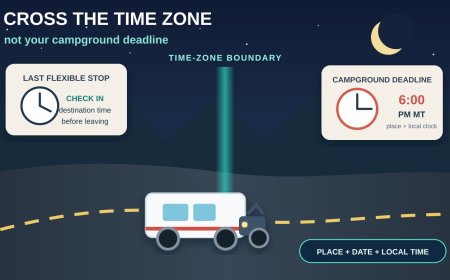
Write each one as a four-part record: event, date, place, local time zone. “Campground check-in by 6” is incomplete. “Campground check-in by 6 p.m. MT at the campground on October 18” is usable.
Use broad labels such as ET, CT, MT, or PT when the source itself uses local time year-round. Use the source's exact label when it specifies MST, MDT, or another abbreviation. Those letters are not decoration. NIST explains that standard-time and daylight-time abbreviations carry different UTC offsets; a year-round “Pacific time” label, by contrast, means whichever local rule is in effect then.[2]
Draw the boundary on the route
A time-zone change is a route event, much like a fuel stop. Put it on the itinerary near the road segment where it occurs. Do not assume every boundary follows a state line, and do not treat the phone's automatic clock change as the plan.
For each travel day, make a small clock card:
| Route point | Time to write down |
|---|---|
| departure | local clock time and zone |
| planned boundary | old zone to new zone |
| last flexible stop | destination-local time |
| fixed appointment | destination-local deadline |
| stop-driving cutoff | destination-local time |
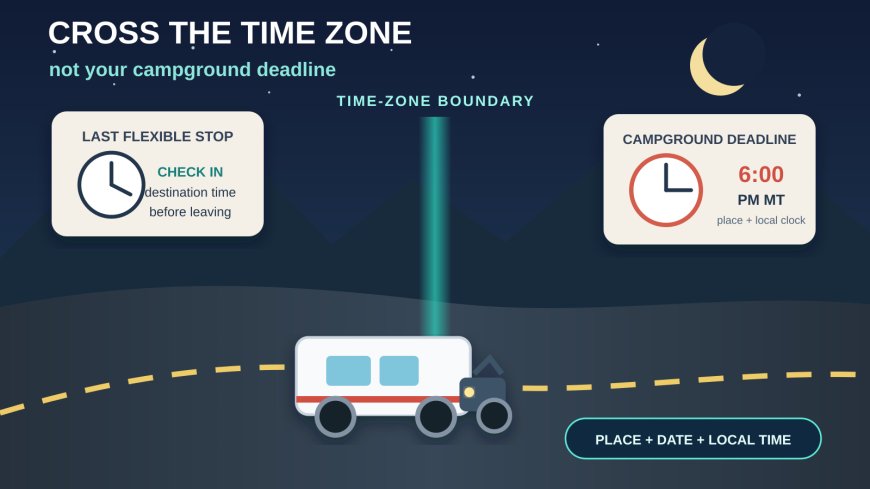
The “last flexible stop” is where the arithmetic becomes operational. Before leaving it, convert the remaining drive, fuel stop, meal break, and setup allowance into the destination's clock. If the margin is gone, call the campground or use the backup stop while choices remain.
Keep elapsed time separate from clock time. A four-hour drive is still four hours. Crossing east may move the displayed clock ahead an hour; crossing west may move it back. Add the duration first, then apply the boundary change. This avoids quietly adding or losing an hour twice.
Treat DST dates as special travel days
In 2026, clocks in observing areas spring ahead on March 8 and return to standard time on November 1. Both changes happen when the local clock reaches 2 a.m.[1] At the March change, the displayed time jumps directly to 3 a.m. At the November change, the 1 a.m. hour occurs twice.[1]
That can affect an overnight drive, an early departure, and any reservation scheduled close to the change. Put the full date, zone, and location beside the appointment. If a confirmation only says “1:30 a.m.” on the fall-back night, ask which occurrence the operator means. If an RV appliance clock, tow-vehicle clock, phone, GPS unit, watch, or pet-feeding timer matters to the day, compare them after the change rather than assuming every device updated.
Most U.S. regions observe DST, but NIST lists exceptions including Hawaii and most of Arizona. The Navajo Nation in Arizona does observe DST.[1] A route can therefore change clock rules without crossing a state line.
Northern Arizona is the useful stress test
The Glen Canyon National Recreation Area FAQ shows why a state-level assumption can fail. The park follows Arizona time, or Mountain Standard Time year-round. The Navajo Reservation observes daylight saving time, the Hopi Reservation does not, and Utah observes daylight saving time.[3] NPS tells visitors with reservations inside Glen Canyon, in Page, or at Lower and Upper Antelope Canyon to consider hard-setting a device to Arizona time to avoid confusion.[3]
Navajo National Monument uses the other side of that local split. Its NPS hours page says that from March through November the park and Navajo Nation observe Mountain Daylight Time, one hour ahead of Flagstaff, Page, and Grand Canyon.[4] The page lists the visitor center's regular hours as 9 a.m. to 5 p.m. MDT and notes that Sunset View Campground remains open when the visitor center is closed.[4]
The practical lesson is not to memorize northern Arizona. It is to distrust a generic “Arizona time” note. Attach the clock rule to the exact destination named on the reservation. If the itinerary includes Page and Navajo National Monument on the same summer day, label both stops separately.
Make the phone prove itself
Automatic time-zone settings are helpful, but they are not evidence that the itinerary is correct. A phone may update late in weak service, a navigation app may display an arrival in destination time without saying so clearly, and a manually selected zone may persist from an earlier trip. NIST notes that computers and phones depend on current operating-system rules to apply local time and DST corrections.[1]
Run this parked check before the boundary:
- Open the official page or reservation confirmation for the fixed appointment.
- Identify whether the stated hour is local time and whether a zone abbreviation appears.
- Compare the phone's automatic setting with a second reference, such as NIST's official time service or the destination's official page.
- Enter the appointment in the calendar with the destination time zone selected, not as a floating hour.
- Save a screenshot or offline note that includes the place, date, local time, contact number, and late-arrival instruction.
After crossing, compare the dashboard, phone, navigation arrival estimate, and written clock card. If one disagrees, stop somewhere legal and resolve it. Do not do clock arithmetic while towing through an interchange.
Build one margin, not two guesses
Suppose the campground office closes at 6 p.m. MT. Your planned last stop is in CT, and the remaining trip is three hours plus a 30-minute fuel stop. Convert the closing time to the clock used at the last stop, or convert the last-stop time to MT. Pick one direction and write it down. Then subtract the 3.5-hour travel block and a separate arrival margin.
The margin should cover the things a route estimate does not settle: slower grades, a fuel queue, road work, finding the correct entrance, and parking before walking into the office. Do not spend the same margin twice by calling it both “traffic time” and “setup time.” Give every buffer one job.
If the appointment is essential, set a decision point. “If we are not rolling from the fuel stop by 1:30 p.m. destination time, we call the campground and switch to the verified backup.” That is far more useful than hoping the phone's arrival estimate stays green.
The local-time departure card
Before an RV travel day that crosses a time boundary, confirm:
- every fixed event has a date, place, local hour, and zone label;
- the route shows each likely time-zone or DST-rule boundary;
- driving duration and clock change are calculated separately;
- the last flexible stop is recorded in destination time;
- the campground's contact and late-arrival instructions are saved offline;
- all drivers know the stop-driving cutoff in destination time;
- the destination's official page has been checked for local quirks;
- phone, dashboard, GPS, and calendar agree after the boundary.
A time-zone plan does not need a new app. It needs explicit labels. Put the place beside the hour, and a boundary becomes a routine checkpoint instead of a missing hour at the end of the day.
Sources
- NIST: Daylight Saving Time Rules — 2026 transition dates, current U.S. rules, exceptions, and device-time context; accessed October 8, 2026.
- NIST: Local Time FAQs — time-zone names, daylight/standard abbreviations, UTC offsets, and local-time labeling; accessed October 8, 2026.
- National Park Service: Glen Canyon Frequently Asked Questions — local clock rules across Glen Canyon, Arizona, the Navajo and Hopi reservations, and Utah; accessed October 8, 2026.
- National Park Service: Navajo National Monument Operating Hours & Seasons — park hours and the daylight-time difference from the rest of Arizona; accessed October 8, 2026.
What's Your Reaction?