






Build an RV trip emergency information card that works offline
Build one private, offline RV emergency card with exact rig identifiers, coverage and roadside numbers, chosen medical and access notes, pet needs, contacts, and the trip route.

By Romana | September 26, 2026 | RV Camping
Quick answer: Make one compact, trip-specific card that identifies every vehicle in the combination, names the companies that can authorize help, lists contacts and any voluntarily shared medical or access needs, and shows the route even when a phone has no signal. Keep the complete card in a closed, known location rather than on the dashboard. Give a separate itinerary copy to someone who is not traveling with you.

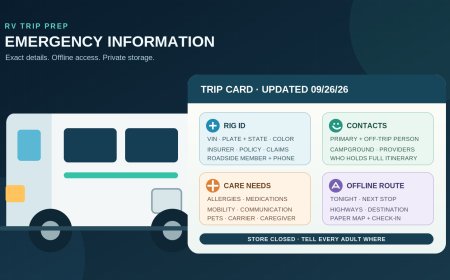
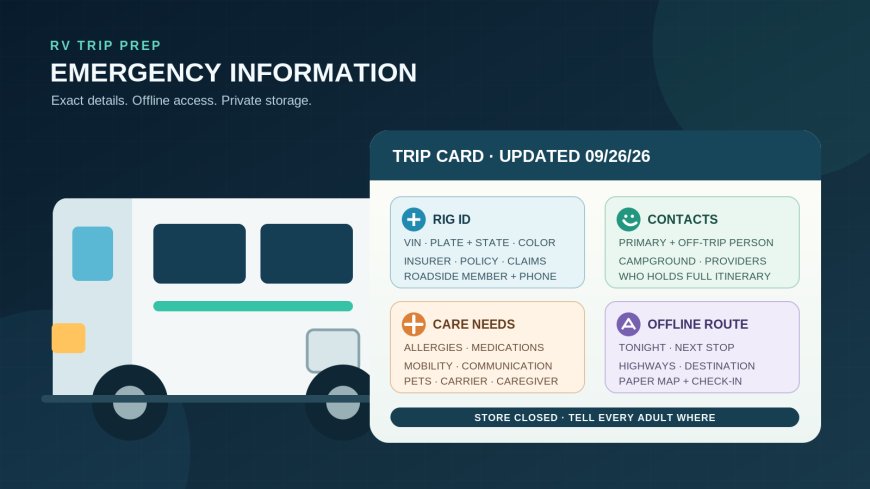
The useful card is short enough to scan, exact enough to dispatch the right help, and stored where the travel party can reach it without advertising private details. Original illustration by RVCamping.info.
One card, three jobs
An RV emergency card is a retrieval tool, not an emergency manual. It should answer three questions without asking an injured, stressed or disconnected traveler to search through apps:
- Which motorhome, tow vehicle or trailer is involved?
- Who can be called, and what account or policy identifies the traveler?
- Where was the group going, who is with them, and what needs could change the response?
Ready.gov recommends documenting household contacts and medical information, then adapting the plan for prescriptions, equipment, disabilities, pets and other daily needs.[1] That framework fits an RV trip, but a single sheet should not become a portable archive of every private record you own.
Use two physical copies. Put the working copy in a closed document pouch or locking console that every adult traveler knows about. Keep the second in another secure, accessible place in the RV or tow vehicle. A photo or encrypted offline copy can help, but it should supplement paper rather than replace it.
Record each part of the rig separately
“White RV” is not useful identification. A pickup and travel trailer are two vehicles; a motorhome may also tow a car. Give each unit its own block:
- year, make, model and exterior color;
- full VIN;
- license plate number and issuing state or province;
- registered owner name, if different from the traveler;
- insurer name, exact policy number and claims phone number;
- roadside provider, exact membership or contract number and dispatch phone number.
Add the rig’s measured overall height and approximate total length on a separate line. Those details can help a dispatcher or facility understand what must fit, but they do not replace the VIN or plate.
Copy, do not remember. Read every character from the registration, insurance card, membership record and vehicle label, then have another person compare the card against those originals. NHTSA’s decoder uses a VIN to identify information encoded in that number, and its displayed data comes from the manufacturer.[2] A transposed character can point to the wrong unit, so verify all 17 positions where a standard 17-character VIN applies.
Do not assume the motorhome badge supplies every identifier. A completed motorhome may have coach and chassis information in different places, while a trailer and its tow vehicle always need separate entries. Label each line plainly: “motorhome VIN,” “chassis VIN if shown,” “tow vehicle VIN,” “trailer VIN” or “toad VIN.” Leave a field blank if it does not apply; never fill uncertainty with a guess.
Put phone numbers on paper, with the reason to call
A list of unlabeled numbers slows everyone down. For each provider, write the organization, the number that works from the countries on the route, the identifier the operator will request and a short purpose:
- emergency services: 911 in the United States and Canada, plus destination-specific numbers where needed;
- insurance claims: insurer, policy number, claims line;
- roadside dispatch: provider, membership number, service line;
- motorhome or chassis support: manufacturer and support line if coverage is active;
- campground, park or host: name, after-hours number and reservation number;
- two personal contacts, including one person not on the trip.
Choose contacts who have agreed to the job. Note each person’s relationship to the travelers and whether they hold the full itinerary, spare keys or copies of records. Ready.gov advises building a support network and keeping the contact list in a watertight container or on an electronic device.[3] For RV travel, paper in a sealed pouch covers the dead-battery case.
Do not copy a phone number from an old card without testing it. Confirm the current claims and dispatch numbers on the provider’s own site or account, and check whether a domestic toll-free number works from the planned route. Date the card after verification.
Make medical details useful and voluntary
Medical information belongs on the card only when the traveler wants it there and it could affect urgent care, communication or transport. A practical entry can include:
- preferred name and date of birth only if the traveler chooses;
- severe medication, food or material allergies;
- current prescription name, dose and schedule;
- a concise condition or device note that changes care;
- prescriber or pharmacy phone number;
- where necessary medication or equipment is stored;
- communication instructions and mobility or transfer needs.
Ready.gov specifically recommends a prescription list with diagnosis, dosage, frequency, supply needs and allergies. It also suggests printed communication cards for people who may need to tell responders how to communicate with them.[3] Keep wording literal. “Power wheelchair; cannot walk; lift requires two people” is more useful than “limited mobility.” “Uses AAC device; ask yes/no questions” gives a clear communication option.
The card is not a substitute for a medication label, medical alert jewelry, a clinician’s care plan or a properly stored supply. Do not add a condition on someone else’s behalf merely because you know it. Review this section privately with each adult traveler, and let that person decide what to include.
Add pets without turning the card into a pet file
List each animal’s name, species, identifying color or markings, microchip number if the owner is comfortable carrying it, regular medication, handling warning and the location of carrier, leash or harness. Include the veterinarian and an off-trip caregiver who has agreed to help.
Ready.gov recommends keeping microchip contacts current, recording an out-of-area emergency contact, and protecting pet registration and related records in a waterproof container with an electronic copy available.[4] The RV card can point to that packet instead of reproducing every vaccination record. A line such as “rabies certificate and medication label: blue pet pouch” is easier to maintain and exposes less information.
Service animals should be identified by the assistance they provide and any immediate care need, not by a demand that the traveler prove disability on the card. Keep the entry focused on continuity: animal’s name, handler, food or medication, relief schedule if relevant, and backup caregiver.
Put the route on the card, not only in an app
The route block changes for every trip. Include:
- departure and expected arrival dates;
- overnight stops with campground or lodging name, city, reservation number and phone;
- primary highways in travel order;
- planned fuel, ferry or border stops that define the route;
- destination address and coordinates when an address is unreliable;
- a brief alternate-route note;
- check-in times agreed with the off-trip contact.
The National Park Service describes a trip plan as a written itinerary that can be shared with a trusted person who is not traveling, including travel details and the expected return time.[5] Send that fuller trip sheet to the contact. The in-rig card can carry the condensed route and say who has the complete version.
Download regional maps before departure and mark the route on a paper road atlas or printed map. NPS notes that its app supports offline park maps but still recommends a backup paper map because a phone can be lost, damaged or run out of power.[6] For highway travel, save state or provincial transportation maps and write down the highway sequence rather than relying on a screenshot of a blue line.
If the route changes materially, update both the card and the trusted contact. Cross out the old stop cleanly, write the new location and time, then send the same change when service returns. An immaculate itinerary that no longer matches the RV is worse than a plainly corrected one.
Use privacy layers instead of leaving everything visible
Exact VINs, policy numbers and medical notes make the card useful. They also make it private. Keep the full sheet out of sight in a closed pouch and tell the travel party where it lives. A small visible rescue note, if you use one, should say only where the emergency packet is located and whether people or pets may need help. It should not display a full VIN, policy number, medication list or home address through a window.
Leave Social Security and Medicare numbers, bank and credit-card details, passwords, PINs, alarm codes, passport scans and unrelated family records off the card. The FTC warns that stolen personal, medical-insurance and Social Security information can be used for identity theft, and advises giving a Social Security number only when necessary.[7]
If a provider’s account requires more sensitive authentication, store that in a password manager or another protected record, not beside the dispatch number. Shred replaced cards. When selling the RV, empty every document pocket and remove stored digital copies from onboard devices.
A fill-in card layout
Use one sheet, front and back if necessary:
Header: trip dates; traveler names; “full itinerary held by”; last verified date.
Vehicle blocks: unit label; year/make/model/color; full VIN; plate/state; height/length where relevant.
Coverage block: insurer; policy; claims line; roadside provider; member number; dispatch line; manufacturer support.
People block: two emergency contacts; chosen allergies, medications and conditions; communication, mobility, power or equipment notes; location of medication and medical documents.
Pet block: name/species/description; medication or handling note; carrier location; veterinarian; backup caregiver; record-pouch location.
Route block: tonight’s stop; next stop; highway sequence; destination; alternate; map location; agreed check-in.
Print clearly, use large type and leave enough white space for a change. Seal it against spills, but avoid permanent lamination if the itinerary changes often. Review it before every departure and whenever coverage, medication, contacts, plates or route details change.
The test is simple: another adult in the RV should be able to find the card, identify every unit and make the right calls without unlocking your phone. If they can, the card is doing its job.
Evidence note: FEMA/Ready.gov supports documenting contacts and needs involving prescriptions, equipment, disability access and pets. NHTSA supports accurate VIN-based identification. NPS supports a written trip plan, a trusted off-trip contact and offline maps with a paper backup. FTC guidance supports minimizing exposed identity data. The one-sheet layout, storage layers and RV-specific field order are RVCamping.info editorial recommendations.
Sources
- Make A Plan | Ready.gov — Emergency-plan contacts, medical information and household needs.
- VIN Decoder | National Highway Traffic Safety Administration — VIN-based vehicle identification and manufacturer-reported data.
- People with Disabilities | Ready.gov — Support networks, communication cards, assistive technology and medication-list fields.
- Prepare Your Pets for Disasters | Ready.gov — Pet identification, emergency contacts, medications and protected records.
- Trip Plan | National Park Service — Written itinerary, trusted contact and expected-return details.
- Trip Planning Guide | National Park Service — Offline maps and a paper navigation backup.
- Pass It On: Identity Theft | Federal Trade Commission — Limiting exposure of personal and identity information.
What's Your Reaction?